
A social media content calendar is a schedule that maps what you post, where you post it, and when it goes live. For small business owners and marketers, it is the single most reliable way to maintain a consistent online presence without burning hours every day on last-minute decisions. Building one does not require expensive software or a dedicated team. Tools like Postory, Later, and Canva make the process accessible, and a functional calendar can be built in roughly two hours by following a clear sequence of steps.
What do you need to create a social media content calendar?
The most common mistake marketers make is choosing a tool before defining a strategy. Picking pillars and cadence first produces a more functional calendar regardless of which software you end up using. Start with strategy, then select your container.

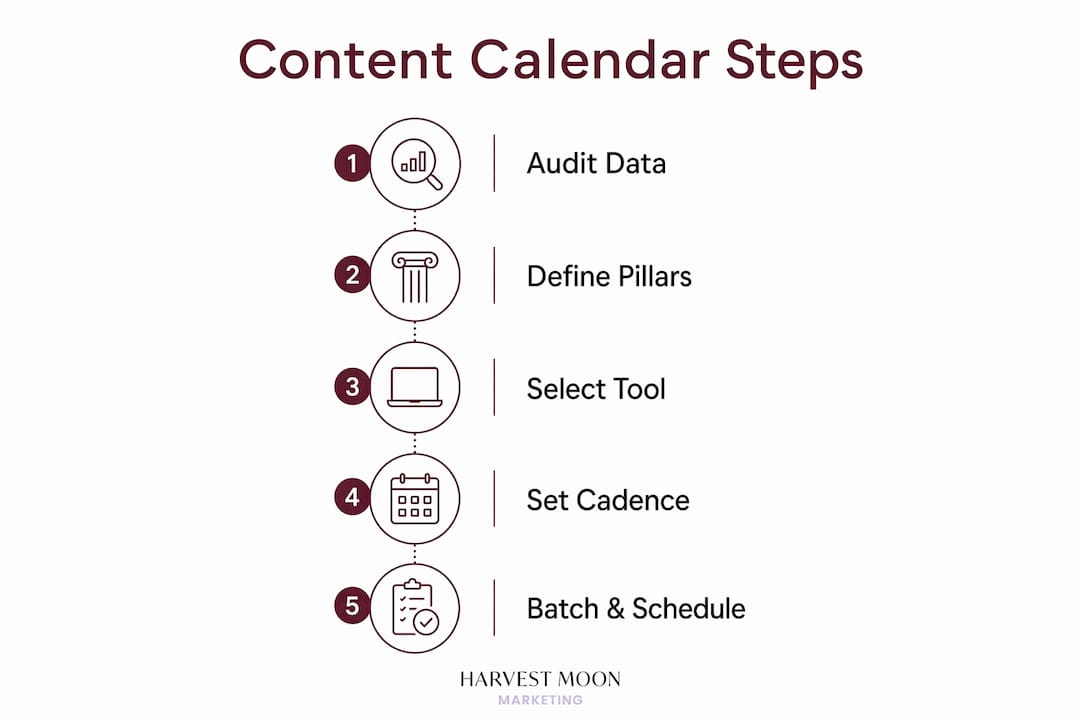
Step 1: Audit your last 90 days
Pull your engagement data from the past 90 days before you plan a single post. You want to identify your top five and bottom five performers. That data tells you which formats your audience responds to, which topics fall flat, and which platforms deserve more of your time. Most native analytics tools on Instagram, Facebook, and LinkedIn surface this data for free.
Step 2: Define 3–5 content pillars
Content pillars are the recurring themes that anchor your posting plan. A local accounting firm might use pillars like tax tips, client success stories, team culture, industry news, and service spotlights. Pillars give every post a clear purpose and prevent the random, scattered posting that erodes audience trust. For a deeper look at building these themes, content pillars explained is a practical resource worth reviewing.
Step 3: Choose your calendar tool
Your tool choice should follow your content logic, not the other way around. The table below compares three common options.
| Tool | Best for | Key advantage | Limitation |
|---|---|---|---|
| Google Sheets / Excel | Solo operators | Free, fully customisable | No native scheduling |
| Notion | Small teams | Flexible databases, collaboration | Requires setup time |
| Postory / Later | Scheduling-focused teams | Bulk upload, auto-publish | Monthly subscription cost |
A professional calendar includes these fields at minimum: date, platform, post format, caption, hashtags, media asset links, and approval status. These calendar fields create consistency and make handoffs between team members straightforward.
Pro Tip: Start with a simple Google Sheet for your first month. Once you know your rhythm, migrate to a scheduling tool like Postory or Later. Jumping straight to complex software before you understand your workflow adds friction, not efficiency.
How do you set a posting cadence that is actually sustainable?
Posting frequency is not a vanity metric. It is a commitment you make to your audience and your own schedule. Set a cadence you can maintain for 90 days without burning out, then scale up if capacity allows.
Platform-specific guidance matters here. Optimal posting days are tuesday through thursday, with early morning and lunch hours performing best across most platforms. LinkedIn audiences are most active early in the morning on weekdays. TikTok engagement peaks in the evenings. Instagram performs well mid-morning on weekdays.
A realistic starting cadence for a small business looks like this:
- Instagram: 3–4 posts per week, mixing Reels and static images
- Facebook: 3 posts per week, leaning on longer captions and link shares
- LinkedIn: 2–3 posts per week, prioritising thought leadership and case studies
- TikTok: 3–5 short videos per week if video production is feasible
Testing posting times for at least two weeks before drawing conclusions gives you data that is specific to your audience, not just general benchmarks. Your followers in Winnipeg or Halifax may behave differently from global averages.
Leave 20–30% of your calendar open. Scheduling every slot with no flexibility hurts engagement because it prevents you from reacting to trending topics, local events, or timely news. A rigid calendar reads as robotic. Your audience notices.
Pro Tip: Never cross-post identical content to every platform at once. Customising captions and media for each platform’s culture and character limits consistently outperforms copy-paste publishing. A LinkedIn caption and an Instagram caption for the same topic should feel like two different conversations.
What is the most efficient workflow for batching and scheduling content?
Batching is the practice of producing multiple pieces of content in a single focused session rather than creating one post at a time each day. Batching content cuts context-switching and doubles throughput, saving several hours per week. Most experienced social media managers batch once or twice weekly in sessions of two to four hours.
The sequence matters. Follow this order for each batch session:
- Write all captions first. Your copy sets the tone and determines what visuals you need.
- Create or source visuals. Use Canva for graphics or pull from a pre-approved brand asset folder.
- Assign hashtags. Research and attach relevant hashtag sets to each post before uploading.
- Upload to your scheduler. Tools like Postory, Later, and Heropost support bulk uploads across multiple platforms.
- Set publish times. Use the platform’s recommended windows or your own tested time slots.
- Flag posts for approval. If you work with a client or manager, mark posts as “pending review” before they go live.
Scheduling tools are the single biggest reliability upgrade for social media management. They remove the risk of forgetting to post and eliminate the daily interruption of manual publishing. For a comparison of the leading options available in 2026, scheduling platform reviews break down features and pricing clearly.
Pro Tip: Keep a shared folder of evergreen content, graphics, and approved captions that you can pull from when a batch session runs short. This buffer prevents last-minute scrambling and keeps your calendar full without extra creative effort.
How do you maintain your content calendar for continuous improvement?
A content calendar is a living document, not a one-time project. Weekly 15-minute reviews are the habit that separates marketers who improve from those who plateau. Use that time to check what posted correctly, what generated strong engagement, and what flopped.
During your weekly review, ask these questions:
- Which posts received the most saves, shares, or comments this week?
- Did any posts underperform despite strong creative? What was different?
- Are upcoming posts still relevant, or has something changed in your business or industry?
- Does next week’s content align with any promotions, events, or campaigns?
- Are there any trending topics worth slotting into your open calendar space?
Adjust upcoming slots based on what the data shows. If your educational carousel posts consistently outperform your promotional graphics, shift the ratio. If tuesday morning posts outperform thursday afternoon posts for your specific audience, move your best content to tuesday. Understanding how social media algorithms work helps you interpret why certain posts gain traction and others do not.
For teams, build an approval step into the calendar workflow. Assign a reviewer to each post before it enters the scheduler. This prevents errors, keeps brand voice consistent, and gives stakeholders visibility without requiring them to be involved in daily execution.
How Harvestmoonmktg supports your social media planning
Harvestmoonmktg works with small business owners and marketers who want a consistent, well-planned social media presence without managing every detail themselves. The team builds content calendars aligned with your business goals, content pillars, and posting cadence, then integrates that plan with your broader marketing activity. Social media works best when it supports your other channels, including email marketing for existing customers and SEO for local visibility. If you want a social media plan that is built on data and maintained with weekly reviews, Harvestmoonmktg’s social media services are a practical next step for businesses ready to post with purpose.
FAQ
What is a social media content calendar?
A social media content calendar is a schedule that maps what you post, on which platform, and when. It reduces daily decision fatigue and keeps your posting consistent over time.
How long does it take to build a content calendar?
A functional calendar takes roughly two hours to build from scratch, covering your audit, pillars, cadence, and first month of slots. Ongoing maintenance requires about 15 minutes per week.
How many content pillars should a small business use?
Three to five content pillars is the standard range. Fewer than three makes your feed repetitive. More than five makes planning and batching harder to manage consistently.
What are the best days to post on social media?
tuesday through thursday, with early morning and lunch hours, performs best across most platforms. LinkedIn favours weekday mornings. TikTok sees stronger engagement in the evenings.
Should I post the same content on every platform?
No. Customising captions and media for each platform consistently outperforms identical cross-posting. Each platform has its own culture, character limits, and audience expectations that reward tailored content.


