
You’re spending money on ads, investing time in SEO, and refining your messaging. Yet leads are quietly slipping away before they ever see your offer. Why website speed loses leads is one of the most underestimated problems in digital marketing today. Pages loading in 1 second convert at 3 times the rate of a site that takes 5 seconds. That gap doesn’t just hurt your conversion rate. It inflates your ad costs, tanks your search rankings, and erodes the trust you’ve worked hard to build.
How speed directly kills your conversions
Most business owners assume their lead problem is a traffic problem. They’re wrong. The traffic is often arriving. It’s leaving before you even know it was there.
Here’s where that gets uncomfortable. Visitors abandoning slow pages often do so before your analytics tracking scripts have a chance to fire. That means your bounce rate data is lying to you. Your actual abandonment is almost certainly worse than your dashboard shows.
The conversion numbers are stark:
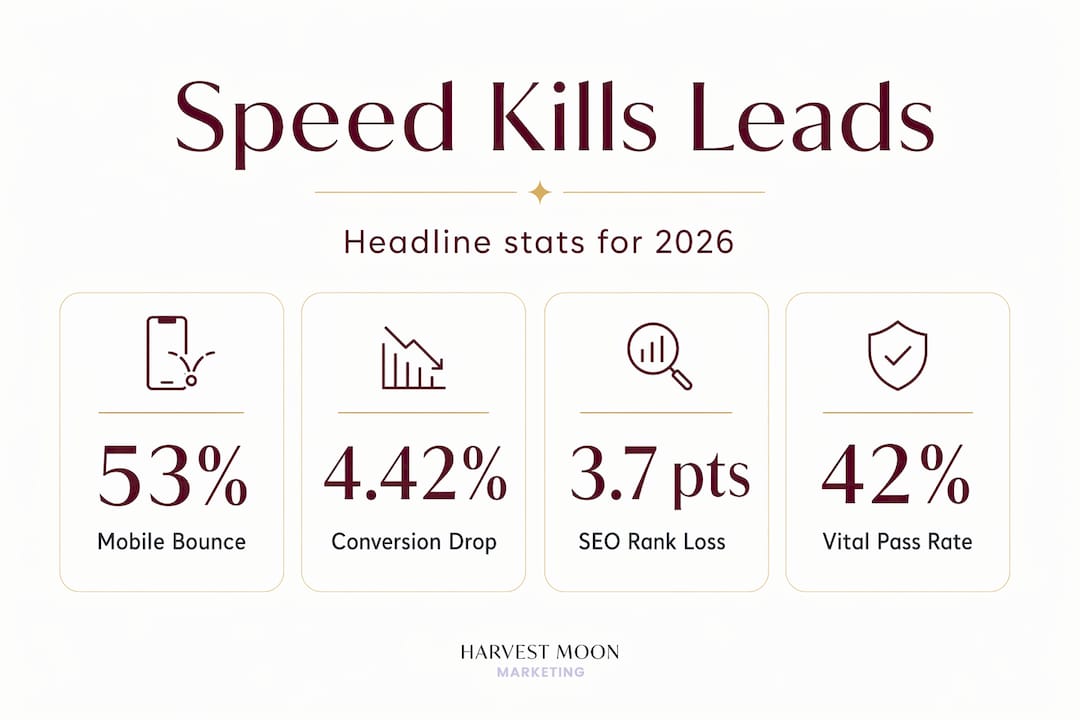
- Conversion rates drop 4.42% for every additional second of load time in the first five seconds of waiting.
- Going from a 1-second load to a 3-second load increases bounce probability by 32%.
- 53% of mobile visitors leave if a page takes longer than 3 seconds to load.
That last stat hits differently when you consider that most of your traffic is probably arriving on a phone.
The impact of website speed on leads isn’t purely mechanical either. It’s psychological. Users judge professionalism based on speed. A slow, clunky site tells visitors you don’t respect their time. It signals that you may not have your act together in other areas either. That perception forms in milliseconds and it almost never recovers.

Pro Tip: If your site loads in more than 3 seconds on a 4G connection, assume you are losing more than half your mobile visitors before they read a single word.
Website speed and SEO: the ranking penalty you can’t ignore
Google made it official. Core Web Vitals are ranking factors. That means how fast your site loads, how stable your layout is, and how quickly it responds to user input directly influence where you show up in search results.
The three Core Web Vitals you need to know are:
- LCP (Largest Contentful Paint): How long it takes the main content to load. Google wants this under 2.5 seconds.
- INP (Interaction to Next Paint): How quickly your page responds after a user clicks or taps. Target under 200 milliseconds.
- CLS (Cumulative Layout Shift): How much your layout jumps around while loading. Lower is always better.
The problem is most sites aren’t passing these thresholds. Only 42% of mobile sites currently pass all three Core Web Vitals. That means more than half of the sites competing for your search terms have a ranking disadvantage baked in.
The gap in actual search visibility is measurable. Sites failing Core Web Vitals rank approximately 3.7 percentage points lower in average search visibility. That may sound modest, but at the local level it can mean the difference between page one and page two. Page two is where leads go to disappear.
| Core Web Vital | What it measures | Google’s good threshold |
|---|---|---|
| LCP | Main content load time | Under 2.5 seconds |
| INP | Interactivity delay | Under 200 milliseconds |
| CLS | Layout stability | Under 0.1 |
AI-powered search tools are adding another layer of complexity. These systems deprioritise slow or unreliable pages when generating answers and citations. If your site has a poor Time to First Byte (TTFB), it signals instability to both Google’s bots and AI crawlers, further reducing the chances your content gets surfaced. Google’s official TTFB threshold is 800 milliseconds, but targeting 200 to 400 milliseconds gives you a meaningful buffer.
Pro Tip: Check your Core Web Vitals monthly in Google Search Console under the “Experience” section. Failing even one metric can create a compounding drag on your organic visibility.
How slow pages inflate your Google Ads costs
This is the part that gets expensive fast. Google’s Quality Score system evaluates your landing page experience alongside your ad relevance and expected click-through rate. A slow landing page drags that score down, and a lower Quality Score means you pay more per click for the same position.
The numbers here are significant:
- Ads with an “above average” landing page experience see CPCs 36% below average.
- Improving page speed can reduce CPC by 25 to 35%.
- A faster landing page not only lowers what you pay per click but also converts more of those clicks into actual leads.
Think about what that means practically. If you’re spending $3,000 a month on Google Ads and your landing page is slow, you may be overpaying by 30% and converting fewer leads at the same time. Fixing your site speed doesn’t just improve user experience. It makes every advertising dollar go further.
There’s a subtler issue here for businesses using AI-driven ad tools. AI ad systems crawl your landing page to generate and optimise ad creatives. If your page relies heavily on JavaScript to render content, most AI crawlers miss what your page is actually about. Non-Google AI crawlers execute zero JavaScript, meaning the page they “see” may be nearly empty. Your ad targeting and creative suggestions suffer as a result.
Pro Tip: After any landing page update, run it through Google Ads’ Landing Page Experience preview. A single unoptimised image or a new third-party script can quietly drop your Quality Score.
Common reasons your site is slower than it should be
Speed problems don’t usually announce themselves. They accumulate quietly through decisions that seemed harmless at the time.
Here are the most common culprits Harvestmoonmktg sees across client websites:
- Unoptimised images. A single high-resolution photo uploaded without compression can add 3 to 5 seconds of load time on its own. Use modern formats like WebP and set dimensions explicitly in your HTML.
- Cheap or shared hosting. When your hosting server is overloaded, your TTFB climbs and every other performance metric suffers downstream. Shared hosting often cannot meet the 200 to 400 millisecond TTFB target under normal traffic conditions.
- Render-blocking scripts. JavaScript and CSS files that load before your page content is visible force the browser to wait. Moving scripts to load asynchronously or deferring non-critical scripts removes this bottleneck.
- Too many third-party scripts. Live chat widgets, analytics tags, consent management tools, and retargeting pixels all add weight. Each one represents an external server request that you don’t control.
- No content delivery network (CDN). Without a CDN, every visitor loads your site from your original server, regardless of their location. A CDN caches your content on servers closer to your visitors, cutting load time significantly.
The site architecture itself can also work against you. Websites built on heavy page-builder frameworks sometimes appear fast to human visitors but are genuinely invisible to AI crawlers due to client-side rendering. The crawler arrives, sees a blank page waiting for JavaScript to execute, and leaves with nothing useful. That costs you both SEO visibility and AI citation opportunities.
| Fix | Effort level | Impact |
|---|---|---|
| Image compression and WebP conversion | Low | High |
| Implement a CDN | Low to medium | High |
| Upgrade to managed hosting | Medium | High |
| Defer or async load JavaScript | Medium | Medium to high |
| Audit and remove unnecessary third-party scripts | Medium | Medium |
Measuring and monitoring your site speed
A one-time speed audit is not enough. Performance regressions sneak in through deployments, plugin updates, and new third-party scripts. Catching a speed issue three months after it appeared means three months of lost leads you can’t recover.
The tools that should be part of your regular process include:
- Google PageSpeed Insights: Free, straightforward, and directly aligned with how Google evaluates your site. Run both mobile and desktop reports.
- GTmetrix: Gives you a detailed breakdown of what is slowing your page down, including a waterfall view of every resource that loads.
- Google Search Console: The “Core Web Vitals” report here shows real-user data from Chrome browsers, not just lab estimates.
- Lighthouse: Built into Chrome DevTools, useful for developers diagnosing specific rendering issues.
The critical distinction is between lab data and field data. Lab data is what a tool generates in a controlled test. Field data reflects what real users on real devices and real connections actually experience. Both matter, but field data is what Google uses for ranking. Continuous speed monitoring using real-user metrics is the only way to catch regressions before they compound into serious ranking and lead losses.
When you integrate site speed into your broader marketing strategy, something shifts. Speed stops being a technical maintenance task and becomes a direct input to your SEO results, your ad spend efficiency, and the quality of leads your site delivers.
Pro Tip: Set a calendar reminder to run a full PageSpeed Insights report every time you publish a new landing page or make significant updates to your site. Don’t wait for the quarterly audit.
My honest take after years of watching businesses bleed leads
I’ve worked with enough business owners to recognise a pattern. They invest heavily in ads, pay for SEO, and spend real time on content. Then they wonder why the results feel inconsistent or expensive. The answer, more often than I’d like, is a website that loads in 6 or 7 seconds.
The frustrating part is that site speed rarely gets treated as a marketing issue. It gets handed off to a developer, fixed once, and forgotten. But speed is a business prerequisite now, not a technical side note. Every dollar you spend on traffic, whether through PPC or organic search, is evaluated against what your site does with that traffic. A slow site taxes every other investment you make.
What I’ve found is that incremental speed improvements compound in ways that surprise people. Shaving one second off your load time isn’t just a one-second improvement for a handful of visitors. It raises your Quality Score, lowers your CPC, improves your Core Web Vitals, moves your rankings, and changes how every new visitor perceives your brand on first contact.
The mindset shift I’d encourage is this: stop thinking about speed as something you fix and start treating it as something you manage. The businesses that get this right don’t have a faster website once. They have a process that keeps it fast permanently.
— Harvest
How Harvestmoonmktg helps you stop losing leads
Speed problems cost you leads from every direction. Organic search suffers, paid campaigns underperform, and the visitors who do arrive leave without converting. At Harvestmoonmktg, we build and manage digital marketing strategies that account for technical performance from the ground up. Our SEO services address Core Web Vitals and technical health as part of improving your organic visibility, not as an afterthought. Our Google Ads management includes landing page performance as a core part of campaign optimisation, keeping your Quality Score high and your cost per lead low. If you want leads coming in from multiple directions and a site built to convert them, explore our full marketing services to find the right fit.
FAQ
How much does a slow website affect conversion rates?
Conversion rates drop roughly 4.42% for every additional second of load time in the first five seconds. A site loading in 5 seconds converts at approximately one-third the rate of a site loading in 1 second.
Does website speed affect Google Ads performance?
Yes. Slow landing pages lower your Quality Score, which raises your cost-per-click. Ads with above average landing page experience see CPCs 36% lower than average, meaning a faster site directly reduces what you pay for every lead.
What is a good page load time for lead generation?
Aim for under 2.5 seconds for your Largest Contentful Paint and a TTFB under 400 milliseconds. 53% of mobile visitors abandon pages that take longer than 3 seconds, so anything above that threshold is actively costing you leads.
Does site speed affect SEO rankings directly?
Yes. Core Web Vitals are official Google ranking factors, and sites that fail them rank approximately 3.7 percentage points lower in average search visibility. Only 42% of mobile sites currently pass all three thresholds.
How often should I check my website speed?
Monthly checks using Google Search Console and PageSpeed Insights are a minimum. Performance regressions from plugin updates or new scripts can appear between quarterly audits, making continuous monitoring far more effective than periodic reviews.


